Durja Otw Magang
Points 247
Solves 6
bang dur otw magang tapi laptopnya kena hack, gimana nyak?
Password:
53599bce04a968bdP.S: nggak tanggung jawab kalo ngerjainnya nggak di safe environment
Author: asburg
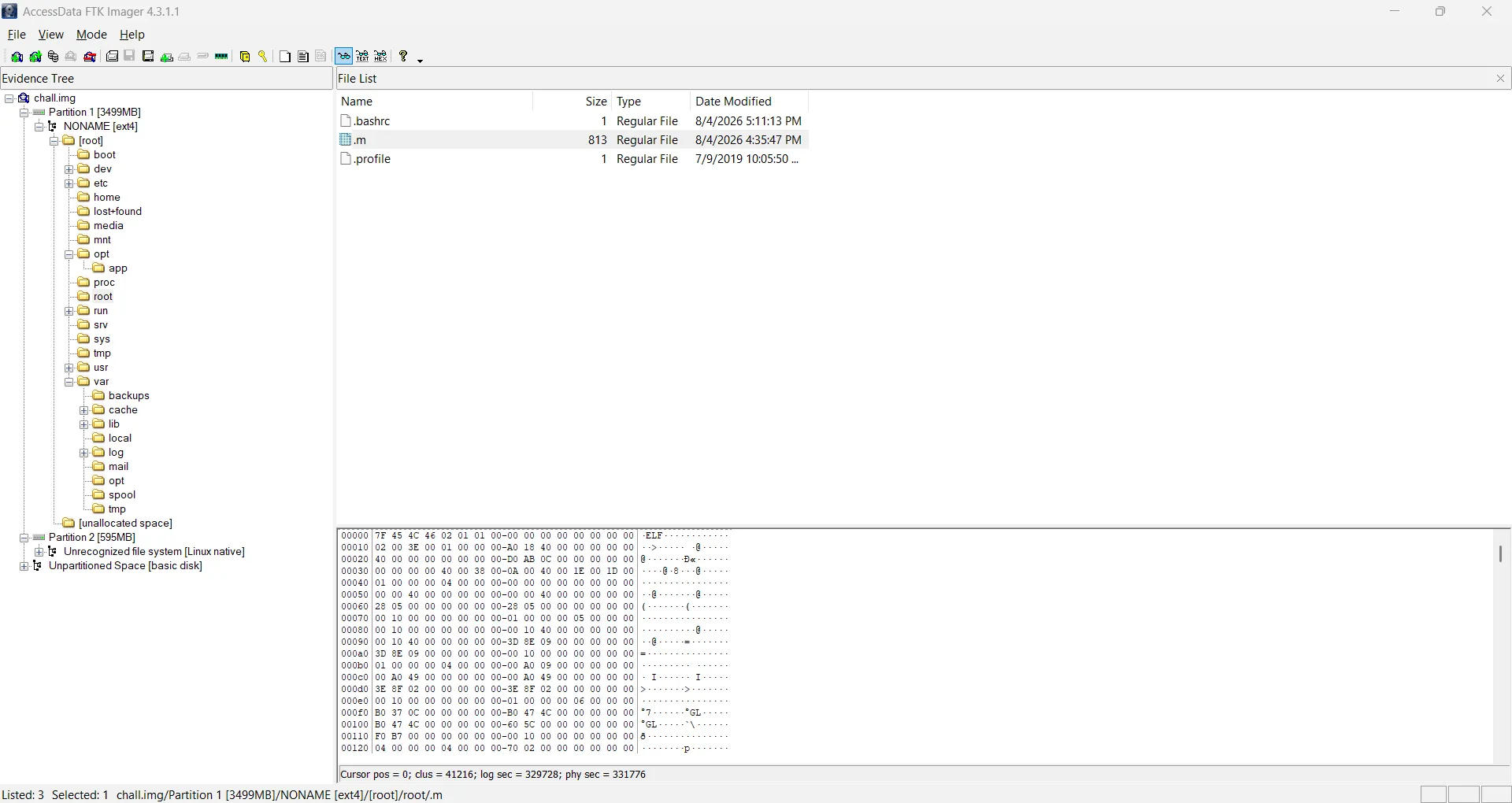
The challenge gives chall.img disk image of the compromised machine. Some digging in the first partition surfaces a hidden file with a suspicious name, /root/.m:
Uploading the sample to VirusTotal, the behavioral report makes its clear. It LUKS-formats /dev/sdb2, opens the resulting volume as stolen, and wipes it with dd, with the passphrase piped in through stdin:
cryptsetup luksFormat /dev/sdb2 -q --key-file=-
cryptsetup open /dev/sdb2 stolen --key-file=-
dd if=/dev/zero of=/dev/mapper/stolen bs=1M
sh -c "dd if=/dev/zero of=/dev/mapper/stolen bs=1M 2>/dev/null"
sh -c "echo -n '7e3b426caac64d470a2224580b55dcda0cb19bd37650be8f9dedfef63bbf2775' | cryptsetup luksFormat /dev/sdb2 -q --key-file=- 2>/dev/null"
sh -c "echo -n '7e3b426caac64d470a2224580b55dcda0cb19bd37650be8f9dedfef63bbf2775' | cryptsetup open /dev/sdb2 stolen --key-file=- 2>/dev/null"
Partition 2 of our image carries a LUKS header:
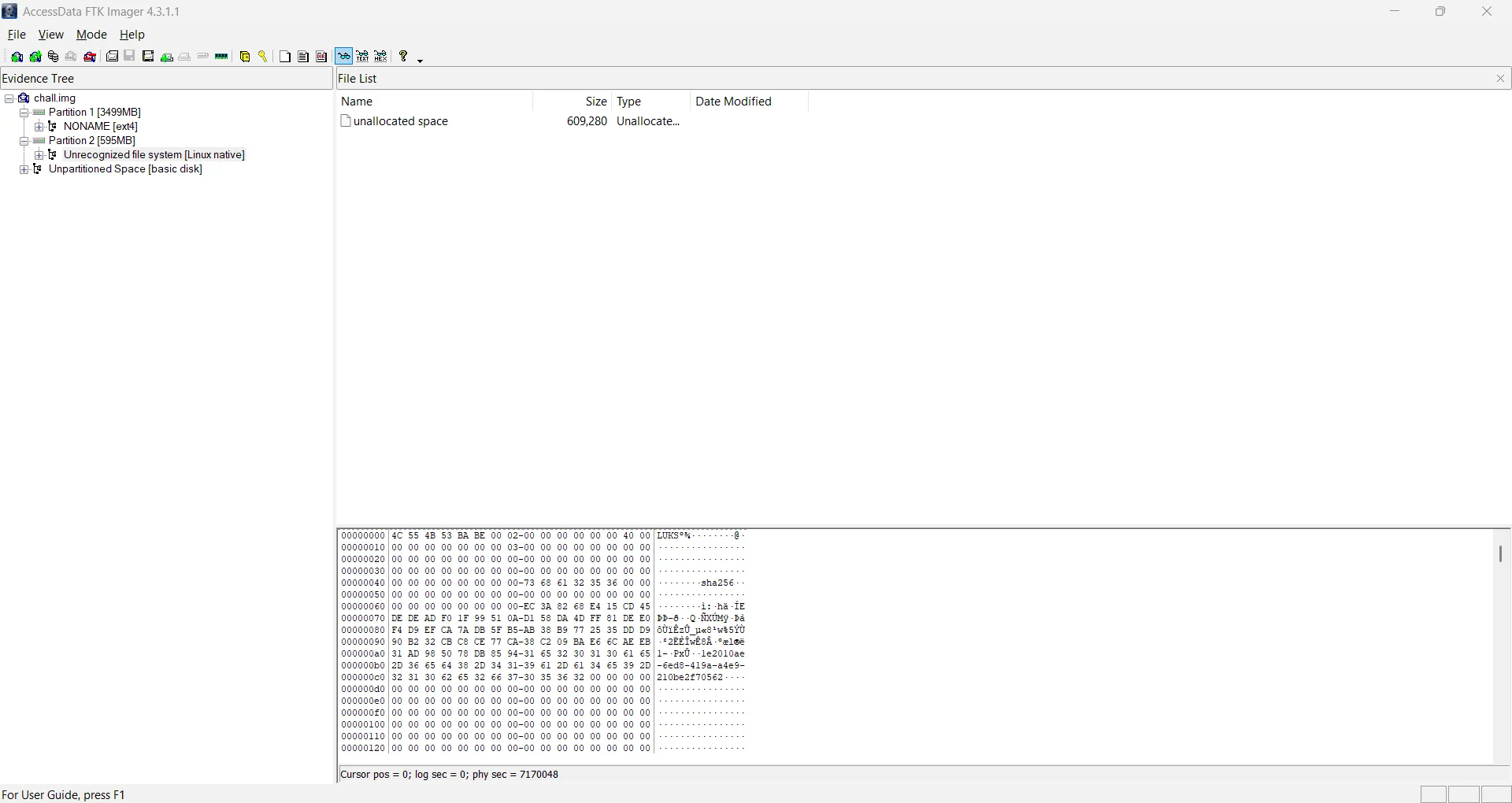
fdisk -l chall.img:
Disk chall.img: 4 GiB, 4294967296 bytes, 8388608 sectors
Units: sectors of 1 * 512 = 512 bytes
Sector size (logical/physical): 512 bytes / 512 bytes
I/O size (minimum/optimal): 512 bytes / 512 bytes
Disklabel type: dos
Disk identifier: 0x62f7955b

Device     Boot   Start     End Sectors  Size Id Type
chall.img1 *       2048 7167999 7165952  3.4G 83 Linux
chall.img2      7170048 8388607 1218560  595M 83 Linux
So the stolen data lives in partition 2. Extract it with dd:
dd if=chall.img of=chall.img2 bs=512 \
  skip=7170048 \
  count=1218560 \
  status=progress
First try the passphrase the behavioral report captured:
echo -n '7e3b426caac64d470a2224580b55dcda0cb19bd37650be8f9dedfef63bbf2775' | cryptsetup open chall.img2 stolen --key-file=- 2>/dev/nullNo key available with this passphrase.The passphrase the sandbox saw is not the passphrase that locked the volume. After some research, the syslog inside the image turns up a second ELF, an executable embedded in a core dump:
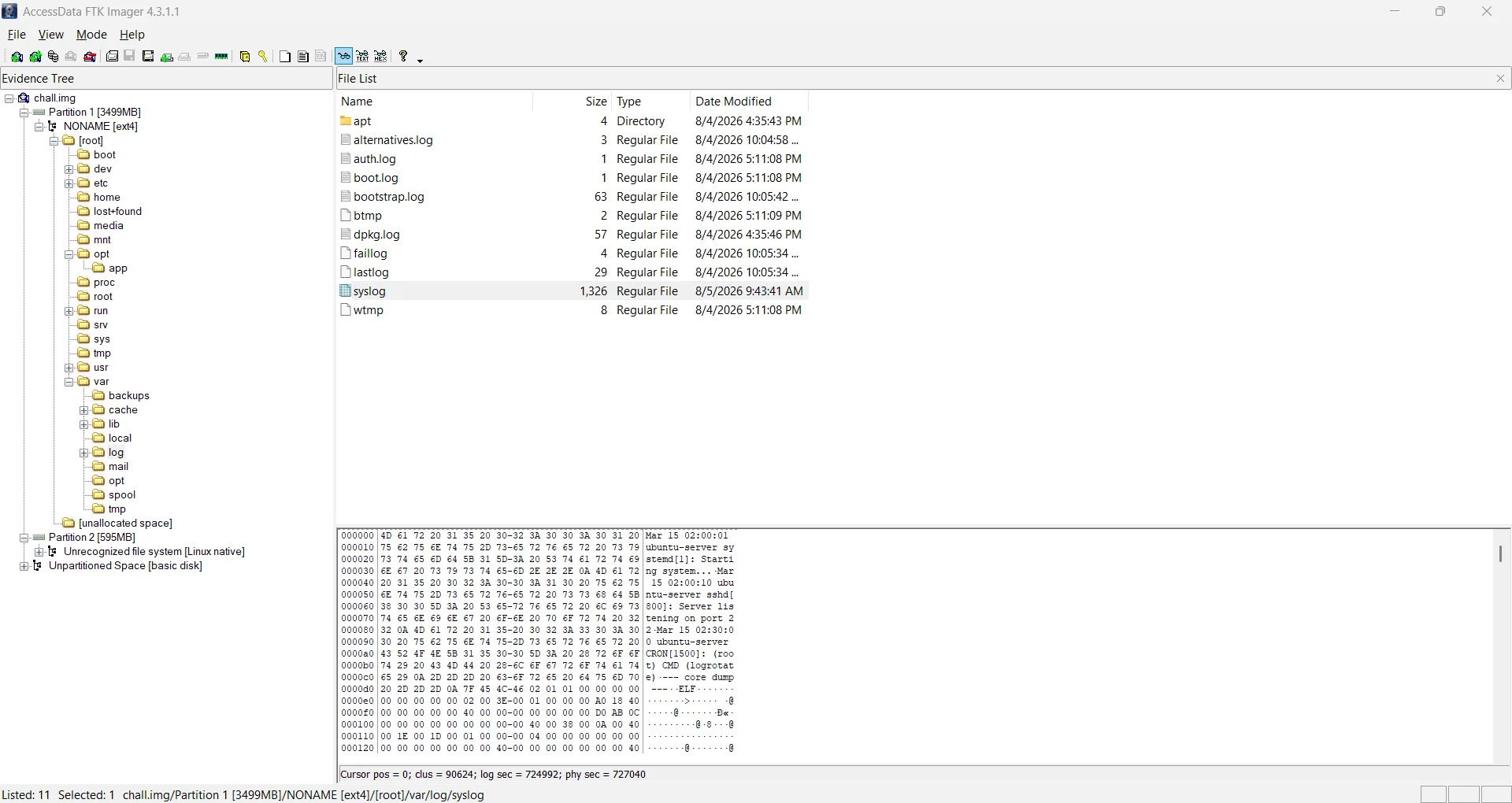
This one still holds whatever the crashed process kept in RAM. Carving it out is straightforward: find the marker line, then read the ELF header’s section table offsets to learn the true size. The carve only needs three fields of the ELF64 header (https://0xax.gitbooks.io/linux-insides/content/Theory/linux-theory-2.html):
The should file ends at e_shoff + e_shnum * e_shentsize:
import re
import struct

f = open('syslog', 'rb')
data = f.read()
f.close()

match = re.search(b'--- core dump ---\n(?=\x7fELF)', data)
off = match.end()

e_shoff = struct.unpack('<Q', data[off + 40:off + 48])[0]
e_shnum = struct.unpack('<H', data[off + 60:off + 62])[0]
e_shentsize = struct.unpack('<H', data[off + 58:off + 60])[0]

size = e_shoff + e_shnum * e_shentsize
elf = data[off:off + size]

f = open('core-dump', 'wb')
f.write(elf)
f.close()
Open in IDA:
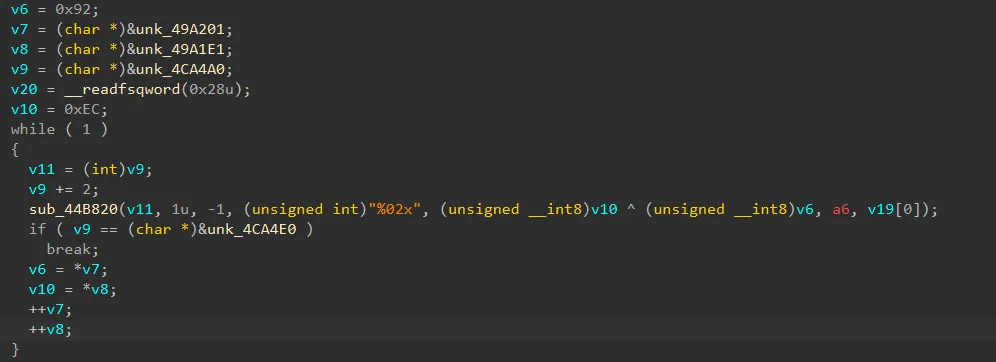
The malware XOR-obfuscates its passphrase, and the obfuscation key is a 32-byte value, together with the obfuscated blob itself. XORing the blob with the key recovers the real one:
from pwn import xor

a = bytes.fromhex('EC3B426CAAC64D470A2224580B55DCDA0CB19BD37650BE8F9DEDFEF63BBF2775')
b = bytes.fromhex('92EAEDC67AB6C00DE71D7A89C2CC58B465D121FB5CB62C9ED41F961945991426')

print(xor(a, b).hex())
This prints 7ed1afaad0708d4aed3f5ed1c999846e6960ba282ae6921149f268ef7e263353, and this passphrase opens the volume:
echo -n '7ed1afaad0708d4aed3f5ed1c999846e6960ba282ae6921149f268ef7e263353' | sudo cryptsetup open chall.img2 stolen --key-file=-sudo mkdir -p /mnt/stolen
sudo mount -o ro,noload /dev/mapper/stolen /mnt/stoleInside the unlocked filesystem, /mnt/stolen/durja/Documents/Kerja/catatan_magang.txt is Durja’s internship diary:
Catatan Harian Magang - PT Nusantara Teknologi
===============================================

Minggu ke-1 (2-6 Juni 2025):
Hari pertama magang dimulai dengan sesi orientasi bersama tim IT.
Saya diperkenalkan dengan infrastruktur jaringan perusahaan yang
menggunakan Cisco router dan switch. Mentor saya, Pak Andi,
memberikan gambaran tentang topologi jaringan yang terdiri dari
3 VLAN utama: production, development, dan guest network.

Minggu ke-2 (9-13 Juni 2025):
Fokus pada monitoring jaringan menggunakan Wireshark dan Nagios.
Saya belajar menganalisis traffic pattern dan mendeteksi anomali.
Ditemukan beberapa percobaan akses tidak sah dari IP eksternal
yang kemudian diblokir oleh firewall.

Minggu ke-3 (16-20 Juni 2025):
Mulai membantu konfigurasi firewall rules untuk segmentasi
jaringan. Pak Andi mengajarkan cara menggunakan iptables dan
nftables. Saya juga mengikuti meeting mingguan dimana dibahas
tentang incident response plan perusahaan.

Minggu ke-4 (23-27 Juni 2025):
Minggu terakhir ditutup dengan simulasi incident response.
Saya bertugas sebagai first responder yang mendeteksi dan
melaporkan insiden. Overall pengalaman magang sangat berharga.

oh iya my prestasi gweh: ITFest2026{sec_eng_bravo_4th_place_lmitd_top_1_region_cbc_rev_role_olivia_big_congratulations_top_solver}
https://chatgpt.com/share/6a76d46f-2bc4-83ec-b11b-035cc0df7391
ITFest2026{sec_eng_bravo_4th_place_lmitd_top_1_region_cbc_rev_role_olivia_big_congratulations_top_solver}